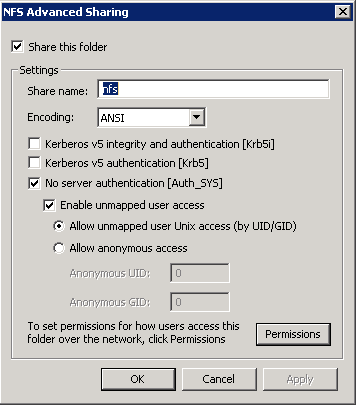
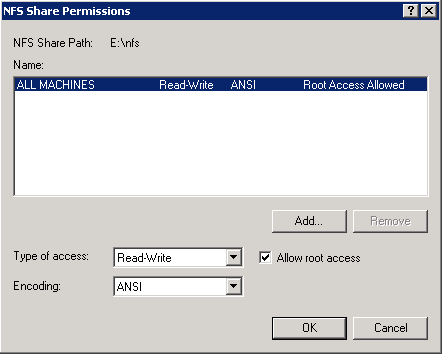
This is something i do in the lab so all of my vm’s are able to access iso’s etc (very handy for quick builds). Quite handy doing it through windows since its easiey enough to setup a windows network share to the same location and update various files via that.
This site has some good clear instructions : http://vmetc.com/2008/02/19/create-a-nfs-share-for-vm-iso-files-with-windows-2003-server-r2/
- On the Windows 2003 Server make sure “Microsoft Services for NFS” in installed. If not you need to add it under Add/Remove Programs, Windows
Components, Other Network File and Print Services - Next go to folder you want to share and right-click on it and select Properties
- Click on the NFS Sharing tab and select “Share this Folder”
- Enter a Share Name, check “Anonymous Access”
- In VirtualCenter, select your ESX server and click the “Configuration” tab and then select “Storage”
- Click on “Add Storage” and select “Network File System” as the storage type
- Enter the Windows Server name, the folder (share) name and a descriptive Datastore Name
- Done. Now you can map CD iso’s to your various vm’s.
This is similar in windows 2008 — screenshots of settings below…