Archive

Posts Tagged ‘zfs’

opensolaris – zfs PCI-e sata controller

September 1st, 2009 Daz No comments

Time for me to add some more sata ports to my opensolaris build. I’ve been using the SI 3114 PCI cards  (4x sata) up until now without any issue, but they are limited by the bandwidth on the PCI slot. Time to upgrade and boost my performance.

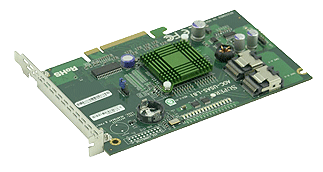
At the moment i’m looking at grabbing one of these UIO cards;

AOC-USAS-L8i

http://www.supermicro.com/products/accessories/addon/AOC-USAS-L8i.cfm

From what iv’e been reading these cards will work fine in a PCI-e slot (8x / 16x) after a bit of modding and display the drives straight to opensolaris without any additional drivers etc. (same chipset used in various sun servers)

The backplate on a UIO card is essentially on backwards, when you remove the backplate and put the card into the PCI-e slot all the components will appear on the other side to normal. It is possible if you have a spare PCI-e backplate to attach to this card (just unscrew the current backplate and replace).

And the required mini SAS to SATA cables from extreme deal;

http://www.dealextreme.com/details.dx/sku.18023

Done.

Updated : 02/09/2009

Put this card in and bingo no problems. Had to export and re-import the zpool as it had problems with the drives being on a different controller? (hadn’t seen that before), but after that everything was working very well as expected. Cool!

Categories: OpenSolaris

zfs compression and latency

August 19th, 2009 Daz No comments

Since im using ZFS as storage via NFS for my some of my vmware environments i need to ensure that latency on my disk is reduced where ever possible.

There is alot of talk about ZFS compression being “faster” than a non-compressed pool due to less physical data being pulled off the drives. This of course depends on the system powering ZFS, but i wanted to run some tests specifically on latency. Throughput is fine in some situations, but latency is a killer when it comes to lots of small reads and writes (in the case of hosting virtual machines)

I recently completed some basic tests focusing on the differences in latency when ZFS compression (lzjb) is enabled or disabled. IOMeter was my tool of choice and i hit my ZFS box via a mapped drive.

I’m not concerned with the actual figures, but the difference between the figures

I have run the test multiple times (to eliminate caching as a factor) and can validate that compression (on my system anyhow) increases latency

Basic Results from a “All in one” test suite… (similar results across all my tests)

ZFS uncompressed:

IOps : 2376.68
Read MBps : 15.14
Write MBps : 15.36
Average Response Time : 0.42
Average Read Response Time : 0.42
Average Write Response Time : 0.43
Average Transaction Time : 0.42

ZFS compressed: (lzjb)

IOps : 1901.82
Read MBps : 12.09
Write MBps : 12.28
Average Response Time : 0.53
Average Read Response Time : 0.44
Average Write Response Time : 0.61
Average Transaction Time : 0.53

As you can see from the results, the AWRT especially is much higher due to compression. I wouldn’t recommend using zfs compression where latency is a large factor (virtual machines)

Note: Under all the tests performed the CPU (dual core) on the zfs box was never 100% – eliminating that as a bottleneck.

Categories: Networking, Storage, Virtual

OpenSolaris – Samba server

August 8th, 2009 Daz No comments

Time to share your newly created ZFS volume via samba to your windows clients.  There is some CIFS / SMB support built into the kernel now, but i’ve grown used to the SMB server…

Fire up add software – click filesystems – enable filter for “smb”, there are three packages generally. I get all three, but you only need the kernel update and the server package. The other is the SMB client.

Once installed make sure you enable the server in servicesgui.

Ensure the filesystem does not have any permission issues. I usually run chmod -R 777 /share just to ensure everyone can access the files without issue.

Add some users into smb password file (U need to create the users and sync the passwords). I usually create a guest user profile

useradd guest

smbpasswd -a guest - it should prompt for password twice (this is the password you use from windows). Press enter twice to leave the password blank.

The configuration can be done via /etc/sfw/smb.conf or via the shared folders admin gui.

I prefer doing the admin via the /etc/sfw/smb.conffile as it tends to let you have more control than the basic options available to you via the GUI. The contents of the file are as follows;  (note: i have included alot of the setting as an example which may contridict other settings)

[global] – global settings, the following are obvious

workgroup = workgroup

server string = opensolaris

wins support = yes - lets your server act as a WINS box


[share] – share name

path = /raidz1/share – share path

available = yes - enabled?

browseable = yes

public = yes

valid users = user1, user2 - only these users can access the share

writable = yes - equivalent to read / write in windows share properties

read only = yes – sets the default permissions to read only

write list = user1, user2 - these users can write to the share. Overrides above “read only” setting.

There are some good examples within /etc/sfw/smb.conf-example. Look there for some tips.

You also have an option of managing samba via the web – SWAT (samba web admin t). To get this up an running enable the swat service svc:/network/swat:default then browse to http://server:901

Optimizing SMB

I’ve found that adding this to /etc/sfw/smb.conf helps throughput in some cases. Try for yourself;  (it tends to put a higher load on cpu)

[global]

aio read size = 1
aio write size = 1

Further to this entry i have discovered that the built in CIFS / SMB service is much more efficient since it is included as part of the kernel. See my other posts on setting up cifs

Updated : 9/08/2009

I’ve swapped back to samba due to the issues i’ve had with cifs in the later releases. Remember if you wish to swap back to samba yo uneed to remove the sharesmb properties from each of your zfs shares – else on reboot zfs will re-enable the server/smb service.

There are some additional settings to ensure that your file server is the master browser for your workgroup. Put these under your [global]

[global]
domain master = Yes
local master = Yes
preferred master = Yes
os level = 35

Apparently on windows the os level reaches only 32 – so setting this to 35 ensures that your file server remains the master browser when an election is performed.

Categories: OpenSolaris

Opensolaris : Citrix XenServer / ESX – Hooking into ZFS

July 22nd, 2009 Daz No comments

To share your zfs pool via NFS (that works with Citrix Xen / ESX) to a host called “esxhost”;

zfs set sharenfs=rw,nosuid,root=esxhost tank/nfs

Note : You MUST have a resolvable name from the opensolaris box. i.e. you should be able to ping it. I have tried with ip’s only and it will fail. I have edited the /etc/hosts file to include the following line for my config;

# Copyright 2007 Sun Microsystems, Inc. All rights reserved.
# Use is subject to license terms.
#
# ident “%Z%%M% %I% %E% SMI”
#
# Internet host table
#
192.168.9.120 esxhost

This also requires that you are using both DNS and Files in your /etc/nsswitch.conf file. You should have a line like so;

# You must also set up the /etc/resolv.conf file for DNS name
# server lookup. See resolv.conf(4). For lookup via mdns
# svc:/network/dns/multicast:default must also be enabled. See mdnsd(1M)
hosts: files dns mdns

# Note that IPv4 addresses are searched for in all of the ipnodes databases
# before searching the hosts databases.
ipnodes: files dns mdns

i’ve also run this before hand; (to allow full access)

chmod -R 777 /tank/nfs

Update : check this guide http://blog.laspina.ca/ubiquitous/running-zfs-over-nfs-as-a-vmware-store

opensolaris / zfs – whitebox build

July 19th, 2009 Daz No comments

I’ve built a little server for home use, but it pales in comparison to this beast… This type of setup would be perfect for a lab / test environment that requires lots of fast and reliable disk. SCSI drives are fading out, SATA can perform if its setup right. When you look at the price of the entire build you wonder why corporations continue to spend the big bucks on the big storage names.

Check out this build (very nice clear guide)   http://www.stringliterals.com/?p=77

rpc-4020b (1)

Awesome piece of work.

Categories: OpenSolaris, Storage