Archive

Posts Tagged ‘opensolaris’

Opensolaris – white screen on logon

October 8th, 2009 Daz No comments

I had this problem when i enabled 3d effects on my server. The screen just goes white and you cannot see anything. Even after a reboot as soon as you logon to gnome the screen goes white.

To fix you’ll need to logon using a “failsafe terminal” session, then run gnome-cleanup from the command line. This will blow away any of your gnome settings (although they are actually backed up to a file), but it’ll mean you’ll be able to logon again without issue.

Categories: OpenSolaris

VirtualBox – crashing / freezing

September 5th, 2009 Daz 2 comments

I’ve had some problems since my upgrade to virtualbox 2.2.0 on OpenSolaris. After some time all of my linux boxes seem to just die. The virtual machine just stops responding. Strangely there was no problem with my windows vms after the update.

From what i can tell it looks like the upgrade turned off “IO APIC” – this is the bit that seemed to cause the problem. Re-enabling this on all of my linux boxes seems to have fixed the problem. I’ll continue testing for another week and update this post if any problems re-occur.

Updated : 01/09/2009

Here is a bit more on IO APIC from the virtualbox wiki…  (from a windows perspective)
http://www.virtualbox.org/wiki/Migrate_Windows

The hardware dependent portion of the Windows kernel is dubbed “Hardware Abstraction Layer” (HAL). While hardware vendor specific HALs have become very rare, there are still a number of HALs shipped by Microsoft. Here are the most common HALs (for more information, refer to this article: http://support.microsoft.com/kb/309283):

Hal.dll (Standard PC)
Halacpi.dll (ACPI HAL)
Halaacpi.dll (ACPI HAL with IO APIC)

If you perform a Windows installation with default settings in VirtualBox, Halacpi.dll will be chosen as VirtualBox enables ACPI by default but disables the IO APIC by default. A standard installation on a modern physical PC or VMware will usually result in Halaacpi.dll being chosen as most systems nowadays have an IO APIC and VMware chose to virtualize it by default (VirtualBox disables the IO APIC because it is more expensive to virtualize than a standard PIC). So as a first step, you either have to enable IO APIC support in VirtualBox or replace the HAL. Replacing the HAL can be done by booting the VM from the Windows CD and performing a repair installation.

Updated : 5/09/2009

I’ve had even more problems with opensolaris crashing completely after upgrading to the newer versions of virtualbox (3.0.4), and have since reverted back to 2.2.0 which has fixed alot of the hanging issues i have encountered

Categories: Linux, OpenSolaris, Virtual

opensolaris – zfs PCI-e sata controller

September 1st, 2009 Daz No comments

Time for me to add some more sata ports to my opensolaris build. I’ve been using the SI 3114 PCI cards  (4x sata) up until now without any issue, but they are limited by the bandwidth on the PCI slot. Time to upgrade and boost my performance.

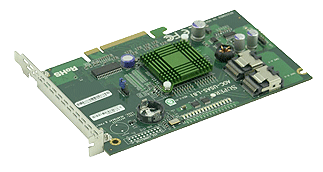
At the moment i’m looking at grabbing one of these UIO cards;

AOC-USAS-L8i

http://www.supermicro.com/products/accessories/addon/AOC-USAS-L8i.cfm

From what iv’e been reading these cards will work fine in a PCI-e slot (8x / 16x) after a bit of modding and display the drives straight to opensolaris without any additional drivers etc. (same chipset used in various sun servers)

The backplate on a UIO card is essentially on backwards, when you remove the backplate and put the card into the PCI-e slot all the components will appear on the other side to normal. It is possible if you have a spare PCI-e backplate to attach to this card (just unscrew the current backplate and replace).

And the required mini SAS to SATA cables from extreme deal;

http://www.dealextreme.com/details.dx/sku.18023

Done.

Updated : 02/09/2009

Put this card in and bingo no problems. Had to export and re-import the zpool as it had problems with the drives being on a different controller? (hadn’t seen that before), but after that everything was working very well as expected. Cool!

Categories: OpenSolaris

OpenSolaris – Samba server

August 8th, 2009 Daz No comments

Time to share your newly created ZFS volume via samba to your windows clients.  There is some CIFS / SMB support built into the kernel now, but i’ve grown used to the SMB server…

Fire up add software – click filesystems – enable filter for “smb”, there are three packages generally. I get all three, but you only need the kernel update and the server package. The other is the SMB client.

Once installed make sure you enable the server in servicesgui.

Ensure the filesystem does not have any permission issues. I usually run chmod -R 777 /share just to ensure everyone can access the files without issue.

Add some users into smb password file (U need to create the users and sync the passwords). I usually create a guest user profile

useradd guest

smbpasswd -a guest - it should prompt for password twice (this is the password you use from windows). Press enter twice to leave the password blank.

The configuration can be done via /etc/sfw/smb.conf or via the shared folders admin gui.

I prefer doing the admin via the /etc/sfw/smb.conffile as it tends to let you have more control than the basic options available to you via the GUI. The contents of the file are as follows;  (note: i have included alot of the setting as an example which may contridict other settings)

[global] – global settings, the following are obvious

workgroup = workgroup

server string = opensolaris

wins support = yes - lets your server act as a WINS box


[share] – share name

path = /raidz1/share – share path

available = yes - enabled?

browseable = yes

public = yes

valid users = user1, user2 - only these users can access the share

writable = yes - equivalent to read / write in windows share properties

read only = yes – sets the default permissions to read only

write list = user1, user2 - these users can write to the share. Overrides above “read only” setting.

There are some good examples within /etc/sfw/smb.conf-example. Look there for some tips.

You also have an option of managing samba via the web – SWAT (samba web admin t). To get this up an running enable the swat service svc:/network/swat:default then browse to http://server:901

Optimizing SMB

I’ve found that adding this to /etc/sfw/smb.conf helps throughput in some cases. Try for yourself;  (it tends to put a higher load on cpu)

[global]

aio read size = 1
aio write size = 1

Further to this entry i have discovered that the built in CIFS / SMB service is much more efficient since it is included as part of the kernel. See my other posts on setting up cifs

Updated : 9/08/2009

I’ve swapped back to samba due to the issues i’ve had with cifs in the later releases. Remember if you wish to swap back to samba yo uneed to remove the sharesmb properties from each of your zfs shares – else on reboot zfs will re-enable the server/smb service.

There are some additional settings to ensure that your file server is the master browser for your workgroup. Put these under your [global]

[global]
domain master = Yes
local master = Yes
preferred master = Yes
os level = 35

Apparently on windows the os level reaches only 32 – so setting this to 35 ensures that your file server remains the master browser when an election is performed.

Categories: OpenSolaris

opensolaris – smbd issues?

July 27th, 2009 Daz 2 comments

Hmm… i’ve been having problems since the 2009.06 (snv_111b) update with cifs.

Cant pin it exactly as it could be “load” related… hmmm.

found this ? http://opensolaris.org/jive/thread.jspa?threadID=107681 this also may be a clue.. http://opensolaris.org/jive/thread.jspa?threadID=92472&tstart=75

imapd ?  might have to go back to 2008.11

You might get better performance if you enable oplocks but
there are known issues with it but you can do it just to
see if you see any difference:

svccfg -s smb/server setprop smbd/oplock_enable=boolean: true

So far running the above command has fixed things for me? I’ll update if the problem returns.

svccfg -s smb/server setprop smbd/oplock_enable=boolean: true

Updated : 27/07/2009

Problem came back, so i’m updating to 117 as per comments below