Windows

HEVC media optimization

Do you have a large collection of video media files not using HEVC (H265) yet? There is a massive amount of disk space coming your way if you flick over to the new video codec format.

HEVC definitely lives up to its name, for most media you can expect a 70% or more disk savings from transcoding from an old codec. There are some catches though… If you want your TV to play it direct (i.e. straight off the file) the codec will need to be supported by it. You can of course get around this by using a media server such as Plex or Emby which will transcode from HEVC back to a compatible format.
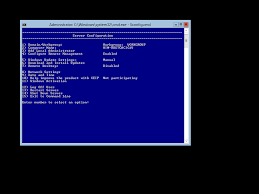
change windows 2012 to core mode

downloadFound yourself considering hyper-v? Microsoft has come a long way and is now becoming more popular as a serious contender in the hypervisor area. My preference is still VMware, but some businesses may find their Microsoft allegiance makes hyper-v a valid option.

Note, i do not consider Microsoft a “cheaper” solution in any circumstance. The current state of hyper-v, SDN options, clustering and VMM management falls very short of what VMware has out of the box. Anyhow, if you do choose windows, here is how you remove the GUI - hopefully saving you a little bit of RAM and reducing the running footprint open for attacks and vulnerabilities….

activate windows from command line - slmgr

Temporarily extend evaluation period (limited execution - see output below)…

C:\Windows\System32>cscript slmgr.vbs /rearm

C:\Windows\System32>shutdown -r -t 1

Show detailed license information…

C:\Windows\System32>cscript slmgr.vbs /dlv

License Status: Initial grace period Time remaining: 43200 minute(s) (30 day(s)) Remaining Windows rearm count: 0

Activate windows…

C:\Windows\System32>cscript slmgr.vbs /ipk xxxxx-xxxxx-xxxxx-xxxxx-xxxxx

C:\Windows\System32>cscript slmgr.vbs /ato

Will require access to the internet - most of the time the issues are either time sync or connectivity to internet.

windows 2012 change key from evaluation to standard

get current version;

dism /online /get-currentedition

Deployment Image Servicing and Management tool Version: 6.2.9200.16384

Image Version: 6.2.9200.16384

Current edition is:

Current Edition : ServerStandardEval

dism /online /set-edition:ServerStandard /ProductKey:xxxxx-xxxxx-xxxxx-xxxxx-xxxxx /AcceptEula

Deployment Image Servicing and Management tool Version: 6.2.9200.16384

Image Version: 6.2.9200.16384

Starting to update components… Starting to install product key… Finished installing product key.

Removing package Microsoft-Windows-ServerStandardEvalEdition31bf3856ad364e35amd64~~6.2.9200.16384 [==========================100.0%==========================] Finished updating components.

Starting to apply edition-specific settings… Finished applying edition-specific settings.

The operation completed successfully. Restart Windows to complete this operation. Do you want to restart the computer now? (Y/N)

windows 2012 - dedup

If you have some archive data that you would like to copy onto a  win 2012 server, but dont know how to estimate the end volume size (if VM etc). Start small - about 1/2 of the total capacity of the drive. Robocopy the data onto the drive until nearly full, manually run dedupe, wait until complete, continue robocopy, repeat and rinse. There will be occasions where you will run out of disk space at that point its time to extend your disk.

KMS count

Getting the KMS count up over the initial threshold is a pain when you only have one server or one workstation to start with. Typically you need at least 5 servers or 25 client machine requesting activation before it will work.

This guy here as created a nice .exe that will trick KMS into thinking it has received all the required requests…

http://forums.mydigitallife.info/threads/39665-KMS-Client-Emulator-for-Increasing-KMS-Server-Client-Count

KMS Client

Using netsh to create a transparent proxy

There are some good windows web proxies about. The only problem with them is they sometimes dont natively act as a transparent proxy. i.e. typically you’ll need to set your client machines to a specific IP and port.

I’ve used squid historically when setting up transparent proxies (mainly since it actually has a transparent mode) and this has worked well. Recently i thought i’d have a go at some of the windows solutions to see how they pan out.

enable TRIM in windows 7

This command will confirm if TRIM has been auto-enabled by windows 7

fsutil behavior query disabledeletenotify

DisableDeleteNotify = 1 (Windows TRIM commands are disabled) DisableDeleteNotify = 0 (Windows TRIM commands are enabled)

If you would like to force it on;

fsutil behavior set disabledeletenotify 0

VirtualBox - crashing / freezing

I’ve had some problems since my upgrade to virtualbox 2.2.0 on OpenSolaris. After some time all of my linux boxes seem to just die. The virtual machine just stops responding. Strangely there was no problem with my windows vms after the update.

From what i can tell it looks like the upgrade turned off “IO APIC” - this is the bit that seemed to cause the problem. Re-enabling this on all of my linux boxes seems to have fixed the problem. I’ll continue testing for another week and update this post if any problems re-occur.

Using W2k3 R2 / W2k8 server as a NFS share for vmware

This is something i do in the lab so all of my vm’s are able to access iso’s etc (very handy for quick builds). Quite handy doing it through windows since its easiey enough to setup a windows network share to the same location and update various files via that.

This site has some good clear instructions : http://vmetc.com/2008/02/19/create-a-nfs-share-for-vm-iso-files-with-windows-2003-server-r2/

  1. On the Windows 2003 Server make sure “Microsoft Services for NFS” in installed. If not you need to add it under Add/Remove Programs, Windows Components, Other Network File and Print Services
  2. Next go to folder you want to share and right-click on it and select Properties
  3. Click on the NFS Sharing tab and select “Share this Folder”
  4. Enter a Share Name, check “Anonymous Access”
  5. In VirtualCenter, select your ESX server and click the “Configuration” tab and then select “Storage”
  6. Click on “Add Storage” and select “Network File System” as the storage type
  7. Enter the Windows Server name, the folder (share) name and a descriptive Datastore Name
  8. Done. Now you can map CD iso’s to your various vm’s.


Diskpart - resizing virtual machine system volumes (windows)

Diskpart works quite well extending disk sizes - …unless its the system disk that you need to extend.

Luckily in the virtual world its somewhat easier to move your disks about. This is a quick list of the steps required to increase your system disk… 

You will need to have another virtual machine available to boot into (windows 2003 etc) 

  1. Shut down the virtual machine with the system disk you wish to extend
  2. Go into virtual machine settings and increase the system drive size to what you require
  3. Now you need your spare w2k3 virtual machine or similar. While it is in a shutdown state add the system disk you wish to extend into this machine as another hard disk. Note: select “existing harddrive” and not the default option of  “new harddrive”, and point to the system drive you wish to extend (It is possible to attach this disk as long it is not on and being used) 
  4. Power up the spare machine with the newly attached hard drive (the drive you wish to extend) 
  5. Logon, open up cmd prompt and type “diskpart” 
  6. Now you need to find and select your disk. Type “list disk” to see available disk numbers (most likely the last drive letter). Then type “select disk #”   (# = the number you got from the list command)
  7. Next select the volume, similar to above type “list volume” then “select volume #”
  8. Type “extend”
  9. Type “exit” 
  10. Done - shutdown the machine and disconnect the drive you just extended. Be carefull not to DELETE the drive, you only want to disconnect it. 
  11. Now you should be able to fire up the original machine and it will have a larger system drive. 

There are obviously other 3rd party utilities to do this but this is handy to know and is actually quite fast.