Windows

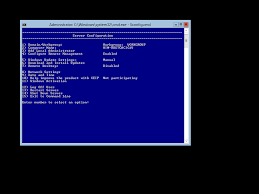
change windows 2012 to core mode
downloadFound yourself considering hyper-v? Microsoft has come a long way and is now becoming more popular as a serious contender in the hypervisor area. My preference is still VMware, but some businesses may find their Microsoft allegiance makes hyper-v a valid option.

Note, i do not consider Microsoft a “cheaper” solution in any circumstance. The current state of hyper-v, SDN options, clustering and VMM management falls very short of what VMware has out of the box. Anyhow, if you do choose windows, here is how you remove the GUI - hopefully saving you a little bit of RAM and reducing the running footprint open for attacks and vulnerabilities….
Finding orphaned GPO policies

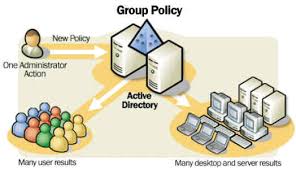
download (1)I’ve used the following attached script to find orphaned GPOs.

It can do the following;

  • GPOs that exist within SYSVOL but not within the GPO management console.
  • Also vice versa - GPOs in management console but not in SYSVOL.

Very handy. GPO Check

SQL Server Setup - Error code 0x84B30002

SQL Server Setup has encountered the following error: No feature were uninstalled during the setup execution. The requested features may not be installed. Please review the summary.txt logs for further details.

Error code 0x84B30002.

Follow the below steps it may help to uninstall, Before follow this procedure please make sure you have some idea about registry

1. Open Registry Editor 2. Navigate to HKEY_LOCAL_MACHINE\SOFTWARE\Microsoft\Windows\CurrentVersion\Uninstall\ 3. Browse Ids one by one and identify the GUIDs for SQL Server 2008 4. Run the below command for all SQL Server 2008 Guids one by one

SQL Express - Backup Plan

SQL express doesn’t have the luxury of SQL maintenance plans, but you can still write a SQL script to dump a database to a particular location and run it via task scheduler on a daily basis.

Create SQL query and save it to a particular location… (NightlyBackup.sql)

DECLARE @pathName NVARCHAR(512)

SET @pathName = ‘D:\SQL Backup\database_’ + Convert(varchar(8), GETDATE(), 112) + ‘.bak’

BACKUP DATABASE [database] TO DISK = @pathName WITH NOFORMAT, NOINIT, NAME = N’db_backup’, SKIP, NOREWIND, NOUNLOAD, STATS = 10

activate windows from command line - slmgr

Temporarily extend evaluation period (limited execution - see output below)…

C:\Windows\System32>cscript slmgr.vbs /rearm

C:\Windows\System32>shutdown -r -t 1

Show detailed license information…

C:\Windows\System32>cscript slmgr.vbs /dlv

License Status: Initial grace period Time remaining: 43200 minute(s) (30 day(s)) Remaining Windows rearm count: 0

Activate windows…

C:\Windows\System32>cscript slmgr.vbs /ipk xxxxx-xxxxx-xxxxx-xxxxx-xxxxx

C:\Windows\System32>cscript slmgr.vbs /ato

Will require access to the internet - most of the time the issues are either time sync or connectivity to internet.

Active Directory- redirect default Containers to Organisational Units

One really useful tidbit I picked up last week –

Redirusr & redircmp

Configures the default OU for computers and users so they don’t appear in the default containers when they are added (effectively meaning they only get root domain policies).

As you would guess – it helps keep the default AD containers clean by placing machines straight into an OU and also applying any policies attached.

windows 2012 change key from evaluation to standard

get current version;

dism /online /get-currentedition

Deployment Image Servicing and Management tool Version: 6.2.9200.16384

Image Version: 6.2.9200.16384

Current edition is:

Current Edition : ServerStandardEval

dism /online /set-edition:ServerStandard /ProductKey:xxxxx-xxxxx-xxxxx-xxxxx-xxxxx /AcceptEula

Deployment Image Servicing and Management tool Version: 6.2.9200.16384

Image Version: 6.2.9200.16384

Starting to update components… Starting to install product key… Finished installing product key.

Removing package Microsoft-Windows-ServerStandardEvalEdition31bf3856ad364e35amd64~~6.2.9200.16384 [==========================100.0%==========================] Finished updating components.

Starting to apply edition-specific settings… Finished applying edition-specific settings.

The operation completed successfully. Restart Windows to complete this operation. Do you want to restart the computer now? (Y/N)

windows 2012 - dedup

If you have some archive data that you would like to copy onto a  win 2012 server, but dont know how to estimate the end volume size (if VM etc). Start small - about 1/2 of the total capacity of the drive. Robocopy the data onto the drive until nearly full, manually run dedupe, wait until complete, continue robocopy, repeat and rinse. There will be occasions where you will run out of disk space at that point its time to extend your disk.

powershell - move machine types to certain OUs in active directory

-------------- select additional parameters ----------------------

Get-ADComputer -Filter * -Properties ipv4Address, OperatingSystem, OperatingSystemServicePack | Format-table name, ipv4*, operatingsystem

-------------- move script -----------------

[cmdletbinding()]

param ( [parameter(mandatory=$true)] $TargetOU )

Import-Module ActiveDirectory $Domain = [ADSI]"" $DN=$domain.distinguishedName $SourcePath = "CN=Computers," + $DN $Computers = Get-ADComputer -Filter * -SearchBase $SourcePath if(!$Computers) { write-host "No Computers are found in default container" return } foreach ($Computer in $Computers) { if(!(Move-ADObject $Computer -TargetPath $TargetOU)) { $Status = "SUCCESS" } else { $Status = "FAILED" } $OutputObj = New-Object -TypeName PSobject $OutputObj | Add-Member -MemberType NoteProperty -Name ComputerName -Value $Computer.Name.tostring() $OutputObj | Add-Member -MemberType NoteProperty -Name SourcePath -Value $SourcePath $OutputObj | Add-Member -MemberType NoteProperty -Name DestinationPath -Value $TargetOU $OutputObj | Add-Member -MemberType NoteProperty -Name Status -Value $Status $OutputObj }

KMS count

Getting the KMS count up over the initial threshold is a pain when you only have one server or one workstation to start with. Typically you need at least 5 servers or 25 client machine requesting activation before it will work.

This guy here as created a nice .exe that will trick KMS into thinking it has received all the required requests…

http://forums.mydigitallife.info/threads/39665-KMS-Client-Emulator-for-Increasing-KMS-Server-Client-Count

KMS Client

Using netsh to create a transparent proxy

There are some good windows web proxies about. The only problem with them is they sometimes dont natively act as a transparent proxy. i.e. typically you’ll need to set your client machines to a specific IP and port.

I’ve used squid historically when setting up transparent proxies (mainly since it actually has a transparent mode) and this has worked well. Recently i thought i’d have a go at some of the windows solutions to see how they pan out.

Windows 7 - Moving to SSD

Want to move your current disk image onto a SSD drive?

Quick, easy and free. Also aligns disk sectors :)

  1. Tidy up your current HDD - delete / move any unneeded items to an archive disk
  2. Shrink the C volume to under the size of the SSD (you do not need to shrink as small as possible, just shrink just under SSD size)
  3. Run Windows Backup (win7 backup is very good, i.e. image backup) onto external USB Drive
  4. Remove your current HDD and install SSD
  5. Restore via Windows Backup — Boot install DVD, and choose Repair your computer, then select recover from windows backup image (use the image you backed up onto your USB drive).
  6. Reboot, then expand the C volume to consume the full space of the SSD

Done.

HP Blade Switch - enable crossover

HP GbE2c Ethernet Blade Switch for HP c-Class BladeSystem User Guide Click here to view the “HP GbE2c Ethernet Blade Switch for HP c-Class BladeSystem User Guide” (http://bizsupport1.austin.hp.com/bc/docs/support/SupportManual/c00701541/c00701541.pdf) HP GbE2c Layer 2/3 Ethernet Blade Switch for c-Class BladeSystem User Guide Click here to go to the “HP GbE2c Layer 2/3 Ethernet Blade Switch for c-Class BladeSystem User Guide” (http://bizsupport1.austin.hp.com/bc/docs/support/SupportManual/c00865010/c00865010.pdf)

http://h20000.www2.hp.com/bc/docs/support/SupportManual/c00700745/c00700745.pdf

Crosslinks

http://h20000.www2.hp.com/bc/docs/support/SupportManual/c00816246/c00816246.pdf

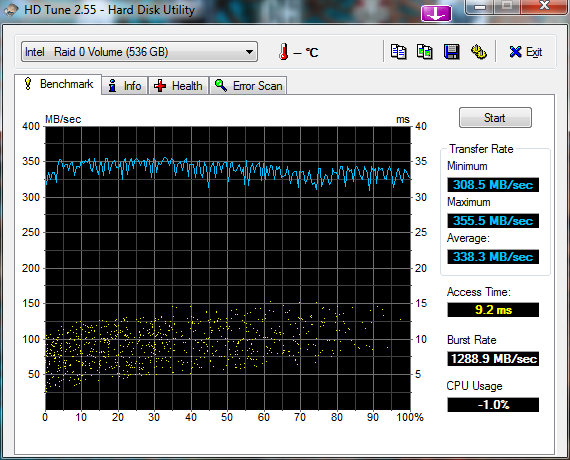
short stroking - v2

I’ve run through this exercise again - my old findings here

4 x 500 WD Black drives – in one big RAID 0 (128K blocks)

and again only using 500GB of capacity (roughly 1/4 of each of the drives)

enable TRIM in windows 7

This command will confirm if TRIM has been auto-enabled by windows 7

fsutil behavior query disabledeletenotify

DisableDeleteNotify = 1 (Windows TRIM commands are disabled) DisableDeleteNotify = 0 (Windows TRIM commands are enabled)

If you would like to force it on;

fsutil behavior set disabledeletenotify 0

windows w2k8 R2 64bit - 32bit ODBC for virtual center server

You must create your ODBC connection using the 32-bit ODBC program. It is not as simple as running odbcad32.exe from the run / search bar.

you must run the following to get the actual 32-bit version;

%systemdrive%\Windows\SysWoW64\Odbcad32.exe

Populate this with the details and you should see it in the virtual center installer.

HDD short stroking - is it worth it?

I’ve got some old 250Gb drives that are starting to show their age. I’ve currently got them setup in a 3x RAID 0 config which presents about 750Gb of space.

I’ve got everything on a single partition (meh, i’m lazy). I’ve done various speed tests in the current setup (with all space allocated), but i thought i’d re-image onto a short stroke partition.

I only use about 150Gb of space on my main machine (most of my data is on another box), so i’m going to try creating a 200Gb partition to test if this provides any kind of performance boost.