Virtual

Unifi Video Controller NVR for UNRAID

If you run UNRAID at home and you have a UniFi Camera system then check out my latest container….

https://hub.docker.com/r/superd/unifi-nvr/

A dockerised UniFi NVR

Ubiquiti UniFi-Video-Controller (NVR) – Docker Container

Ubuntu 16.04, UniFi-Video-Controller 3.8.3

Setup / Quick Start

docker run \
--net=host \
-v /var/lib/unifi-video/:<YOUR DATA DIR> \
-v /var/log/unifi-video/:<YOUR LOG DIR> \
superd/unifi-nvr

Troubleshooting

UNRAID - If you have issue with MongoDB continually restarting please check your data mapping. I have seen issues where user shares do not work correctly. Please try mapping direct to a single disk or to cache drive to ensure smooth operation.

my first few docker containers

This is my first dabbling in creating my OWN git hub (for the code) and docker hub (for the orchestration / build)

https://hub.docker.com/u/superd/

I have created a container for Unifi-Video NVR and storj. Yet to update documentation on Storj container.

I’m currently working on building containers for a news indexer, either newsnab or nzedb. There is another docker project called pynab which was an interesting idea, but seems to have gone stale over time. It used to be almost hands free indexer that ran reasonably efficiently. I’m hoping to re-create something similar soon.

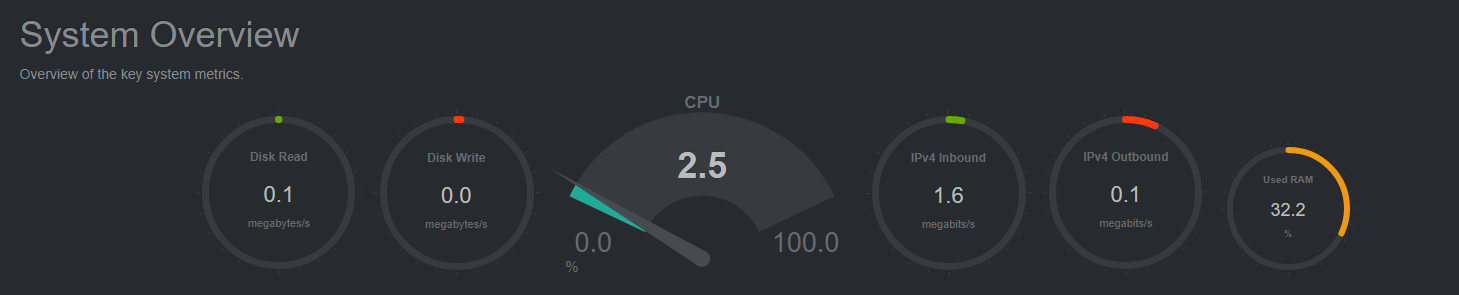
netdata - live server metrics

If your looking for a really good opensource realtime resource monitoring tool check out netdata.io

Very light, looks great and is super fast. I have it running as a docker instance on my unraid server (which runs this website, and a couple of other docker instances).

If you want to show extra info about containers / docker running on your host add the following host mappings;

container <- host

/var/run/docker.sock  <–  /var/run/docker.sock /host/proc  <–  /proc /host/sys  <–  sys

Docker - Running Ubiquiti NVR and Plex

downloadBye bye virtual machines and their inherent OS bloat. Docker and containerization is here…

The trick to containerization is picking the right workload (as with most things). Think about data, its state and where it lives and whether there are any benefits to running as a container.

Both Ubiquiti’s NVR and Plex’s media server software run’s some base application, this app within its own container then maps to data (which can exist outside the instance) that is consistent.

setup vmware environment

vmwareOne of the scripts i use to standardise our vmware host deployments;

# Author : Darren T # v1 : Setup vcenter parameters # Usage ; # Please manually connect to vCenter, use "Connect-VIServer" -- this promotes usernames and passwords not being saved with script. # Modify Variables below before running. # ------------------- VARIABLES ------------------------- # Database Retention Policy $Days_Retension = "30" # Set SMTP Server & Sender Account $SMTP_Server = "192.168.9.10" $Sender_Account = "[email protected]" # ------------------- CODE ONLY BELOW ------------------- # Database Retention Policy -- Enable limits # Get-AdvancedSetting -Entity $defaultVIServer | where {$_.Name -match "^task.|^event."} Write-Host "Setting Database Retension... " -NoNewLine; Get-AdvancedSetting -Entity $defaultVIServer -Name "event.maxAge" | Set-AdvancedSetting -Value $Days_Retension -Confirm:$false Get-AdvancedSetting -Entity $defaultVIServer -Name "event.maxAgeEnabled" | Set-AdvancedSetting -Value $true -Confirm:$false Get-AdvancedSetting -Entity $defaultVIServer -Name "task.maxAge" | Set-AdvancedSetting -Value $Days_Retension -Confirm:$false Get-AdvancedSetting -Entity $defaultVIServer -Name "task.maxAgeEnabled" | Set-AdvancedSetting -Value $true -Confirm:$false # Set SMTP Server & Sender Account Write-Host "Setting SMTP Server & Sender Account... " -NoNewLine; Get-AdvancedSetting -Entity $defaultVIServer -Name "mail.smtp.server" | Set-AdvancedSetting -Value $SMTP_Server -Confirm:$false Get-AdvancedSetting -Entity $defaultVIServer -Name "mail.sender" | Set-AdvancedSetting -Value $Sender_Account -Confirm:$false

nested hypervisor (on ESXi 5.1)

Sometimes you might want to run a hypervisor on a hypervisor for testing purposes…. this is how you pass through the required CPU extensions in ESXi 5.1

Remember you will also need to enable promiscuous mode on the networking side also.

http://www.virtuallyghetto.com/2012/08/how-to-enable-nested-esxi-other.html

There are some changes with Nested Virtualization in vSphere 5.1 also officially known as VHV (Virtual Hardware-Assisted Virtualization). If you are using vSphere 5.0 to run Nested ESXi or other nested Hypervisors, then please take a look at the instructions in this article. With vSphere 5.1, there have been a few minor changes to enable VHV.

  1. The new Virtual Hardware 9 compatibility will be required when creating your nested ESXi VM, Virtual Hardware 8 will not work if you are running ESXi 5.1 on your physical host. You will still need to enable promiscuous mode on the portgroup that will be used for your nested ESXi VM for network connectivity.
  2. vhv.allow = “true” is no longer valid for ESXi 5.1 to enable VHV. A new parameter has been introduced called vhv.enable = “true” that is now defined on a per VM basis to provide finer granularity of VHV support. This also allows for better portability between VMware’s hosted products such as VMware Fusion and Workstation as they also support the vhv.enable parameter.
  3. You can now enable VHV on a per VM basis and using the new vSphere Web Client which basically adds the vhv.enable = “true” parameter to the VM’s .VMX configuration file.

HP Gen 8 servers and networking issues - TG3 driver

There is a bug in the tg3 driver on the ESXi hosts (1gbit broadcom cards in the new hosts). If the network card is put under load and netqueue is enabled it will sometimes decide to drop all traffic. Essentially i’ve disabled netqueue and the problems have gone away…. as per this vm kb :

http://kb.vmware.com/kb/2035701

The isues will present themselves as log entires like so;

2012-11-19T18:58:52.137Z cpu17:4155)<6>tg3 : vmnic8: RX NetQ allocated on 1 2012-11-19T18:58:52.138Z cpu17:4155)<6>tg3 : vmnic8: NetQ set RX Filter: 1 [00:50:56:71:46:87 0] 2012-11-19T18:58:52.138Z cpu17:4155)<6>tg3 : vmnic7: RX NetQ allocated on 1 2012-11-19T18:58:52.138Z cpu17:4155)<6>tg3 : vmnic7: NetQ set RX Filter: 1 [00:50:56:71:46:87 0] 2012-11-19T18:59:12.139Z cpu21:4155)<6>tg3 : vmnic4: NetQ remove RX filter: 1 2012-11-19T18:59:12.139Z cpu21:4155)<6>tg3 : vmnic4: Free NetQ RX Queue: 1 2012-11-19T18:59:22.137Z cpu24:4155)<6>tg3 : vmnic4: RX NetQ allocated on 1 2012-11-19T18:59:22.138Z cpu24:4155)<6>tg3 : vmnic4: NetQ set RX Filter: 1 [00:50:56:71:46:87 0] 2012-11-19T18:59:42.138Z cpu21:4155)<6>tg3 : vmnic7: NetQ remove RX filter: 1 2012-11-19T18:59:42.138Z cpu21:4155)<6>tg3 : vmnic7: Free NetQ RX Queue: 1 2012-11-19T18:59:42.140Z cpu21:4155)<6>tg3 : vmnic4: NetQ remove RX filter: 1 2012-11-19T18:59:42.140Z cpu21:4155)<6>tg3 : vmnic4: Free NetQ RX Queue: 1 2012-11-19T19:00:02.139Z cpu28:4155)<6>tg3 : vmnic8: NetQ remove RX filter: 1

vmware - copy networking port groups to another host

You might be able to do this via “host profiles” but if you do not have the licensing for it, this is the alternative. Very handy if you have over 50 or so port groups. It can be re-run to add to additional hosts as needed.

Install powercli, run the following to obtain your current list of virtual port groups off existing host;

Get-VirtualPortGroup -VirtualSwitch vSwitch0 -VMHost esx-01

Grab the output and place into CSV file or copy straght into Excel…

vmware - updating vcenter email alert for monitoring

I’ve used the following powershell script to assist with setting up a consistant email alert on various vmware envionrments.

# Usage ; # Please manually connect to vCenter, use "Connect-VIServer" -- this promotes usernames and passwords not beings saved with script. # Update below variable with email(s) use comma as delimita $MailtoAddresses= “[email protected]”

#—-These Alarms will send a single email message and not repeat —- $LowPriorityAlarms=“Timed out starting Secondary VM”,` “No compatible host for Secondary VM”,` “Virtual Machine Fault Tolerance vLockStep interval Status Changed”,` “Migration error”,` “Exit standby error”,` “License error”,` “Virtual machine Fault Tolerance state changed”,` “VMKernel NIC not configured correctly”,` “Unmanaged workload detected on SIOC-enabled datastore”,` “Host IPMI System Event Log status”,` “Host Baseboard Management Controller status”,` “License user threshold monitoring”,` “Datastore capability alarm”,` “Storage DRS recommendation”,` “Storage DRS not supported on host”,` “Datastore is in multiple datacenters”,` “Insufficient vSphere HA failover resources”,` “License capacity monitoring”,` “Pre-4.1 host connected to SIOC-enabled datastore”,` “Virtual machine cpu usage”,` “Virtual machine memory usage”,` “License inventory monitoring”

vmware - list all IPs on guest machines

If DNS is failing you…. You can run the following powercil script to list all IP’s to virtual machines within vmware….

$IPaddresses = @()

foreach($vm in Get-VM){ $vm.Guest.VmName | %{ $IPaddresses += $_ } $vm.Guest.IPAddress | %{ $IPaddresses += $_ } }


$IPaddresses

Wan Acceleration Appliances

There are some really good products out there in the market at the moment…

Exinda - low cost, really good QOS / prioitisation and visibility. Falls short on acceleration (at the moment) Riverbed - One of the key players in the acceleration market. Optimized algorithms for specific traffic. Silver Peak - Relatively new, work well as a capture all acceleration device with QOS / prioritisation included.

One to watch - traffic squeezer. I’m always a fan of open source getting into new technologies, and this project seems to be a good start. Its still early days but I’m hopeful this will take off and become a contender in the future ahead.

vmware 4.x esxi - kill virtual machine stuck powering off

Logon to SSH or console and complete the following (WINXP-12 is name of machine causing me greif)

~ # ps | grep WINXP-12 39770348      vmm0:WINXP-12 39790829 39799011 mks:WINXP-12     /bin/vmx 39790834 39799011 vcpu-0:WINXP-12  /bin/vmx

~ # kill -9 39790834

vmware : IDE to SCSI

I’ve found that vmware converter (this may be fixed in newer verions) creates vmware guests with an IDE controller. There can be performance issues if you choose to remain with this particular controller… Best bet is to change it to one of the various vmware SCSI controllers…

Depending on which windows operating system you are running depends on which controller you use….  http://kb.vmware.com/selfservice/microsites/search.do?language=en_US&cmd=displayKC&externalId=1006621

Guest Operating System Adapter Type
Windows 2003, 2008, Vista lsilogic
Windows NT, 2000, XP buslogic
Linux lsilogic


vmware - finding orphaned files

Use following script for finding orphaned files in your vmware env…

# # Purpose : List all orphaned vmdk on all datastores in all VC's # Version: 1.1 # Author : HJA van Bokhoven # Modifications: LucD

$arrayVC = @(“server”) $report = @()

foreach ($strVC in $arrayVC) { Connect-VIServer $strVC $arrUsedDisks = Get-View -ViewType VirtualMachine | % {$_.Layout} | % {$_.Disk} | % {$_.DiskFile} $arrDS = Get-Datastore | Sort-Object -property Name foreach ($strDatastore in $arrDS) { Write-Host $strDatastore.Name $ds = Get-Datastore -Name $strDatastore.Name | % {Get-View $_.Id} $fileQueryFlags = New-Object VMware.Vim.FileQueryFlags $fileQueryFlags.FileSize = $true $fileQueryFlags.FileType = $true $fileQueryFlags.Modification = $true $searchSpec = New-Object VMware.Vim.HostDatastoreBrowserSearchSpec $searchSpec.details = $fileQueryFlags $searchSpec.matchPattern = "*.vmdk" $searchSpec.sortFoldersFirst = $true $dsBrowser = Get-View $ds.browser $rootPath = "["+$ds.summary.Name+"]"

vmware - cpu ready (what to look for) and performance

keeping things simple – below are the numbers to look for when your investigating cpu scheduling issues withing a vmware environment…

Look for the cpu “ready” counter which is a percentage of time that the virtual machine was ready, but could not get scheduled to run on the physical CPU. CPU ready time is dependent on the number of virtual machines on the host and their CPU loads.

These are the peak / average figures to watch for in vmware performance graphs. Anything above 5% cpu ready time is worth fixing. (Note : the sampling rate is different depending on which view you are looking at)

vmware and NLB (unicast vs multicast)

Thought I’d get a bit of clarification around this one. VMWare states –

VMware recommends that you use multicast mode, because unicast mode forces the physical switches on the LAN to broadcast all Network Load Balancing traffic to every machine on the LAN.

There are some issues which come to the surface if you are using unicast. Where possible we should always try to use a Multicast NLB as Unicast can cause some complications around vSwitch configurations. (requirement to change switch notifications to “No” – and seemingly break port id teaming). Detail below;