Posts

Using netsh to create a transparent proxy

There are some good windows web proxies about. The only problem with them is they sometimes dont natively act as a transparent proxy. i.e. typically you’ll need to set your client machines to a specific IP and port.

I’ve used squid historically when setting up transparent proxies (mainly since it actually has a transparent mode) and this has worked well. Recently i thought i’d have a go at some of the windows solutions to see how they pan out.

Wan Acceleration Appliances

There are some really good products out there in the market at the moment…

Exinda - low cost, really good QOS / prioitisation and visibility. Falls short on acceleration (at the moment) Riverbed - One of the key players in the acceleration market. Optimized algorithms for specific traffic. Silver Peak - Relatively new, work well as a capture all acceleration device with QOS / prioritisation included.

One to watch - traffic squeezer. I’m always a fan of open source getting into new technologies, and this project seems to be a good start. Its still early days but I’m hopeful this will take off and become a contender in the future ahead.

Windows 7 - Moving to SSD

Want to move your current disk image onto a SSD drive?

Quick, easy and free. Also aligns disk sectors :)

  1. Tidy up your current HDD - delete / move any unneeded items to an archive disk
  2. Shrink the C volume to under the size of the SSD (you do not need to shrink as small as possible, just shrink just under SSD size)
  3. Run Windows Backup (win7 backup is very good, i.e. image backup) onto external USB Drive
  4. Remove your current HDD and install SSD
  5. Restore via Windows Backup — Boot install DVD, and choose Repair your computer, then select recover from windows backup image (use the image you backed up onto your USB drive).
  6. Reboot, then expand the C volume to consume the full space of the SSD

Done.

Cisco VTP on HP Switches?


Want to propergate vLan information across multiple switches?

Easy in the Cisco world…  Just use VTP - configure a server switch and  your away… (it also has its risks if you introduce another server switch with a lower ID)

What does HP have?  – GVRP (MVRP newer iteration).

http://en.wikipedia.org/wiki/Multiple_Registration_Protocol

Multiple VLAN Registration Protocol (MVRP), which replaced GARP VLAN Registration Protocol (GVRP), is a standards-based Layer 2 network protocol, for automatic configuration of VLAN information on switches. It was defined in the 802.1ak amendment to 802.1Q-2005.

HP Blade Switch - enable crossover

HP GbE2c Ethernet Blade Switch for HP c-Class BladeSystem User Guide Click here to view the “HP GbE2c Ethernet Blade Switch for HP c-Class BladeSystem User Guide” (http://bizsupport1.austin.hp.com/bc/docs/support/SupportManual/c00701541/c00701541.pdf) HP GbE2c Layer 2/3 Ethernet Blade Switch for c-Class BladeSystem User Guide Click here to go to the “HP GbE2c Layer 2/3 Ethernet Blade Switch for c-Class BladeSystem User Guide” (http://bizsupport1.austin.hp.com/bc/docs/support/SupportManual/c00865010/c00865010.pdf)

http://h20000.www2.hp.com/bc/docs/support/SupportManual/c00700745/c00700745.pdf

Crosslinks

http://h20000.www2.hp.com/bc/docs/support/SupportManual/c00816246/c00816246.pdf

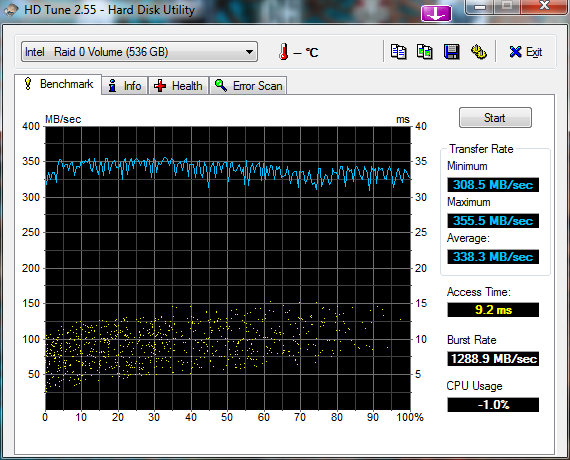
short stroking - v2

I’ve run through this exercise again - my old findings here

4 x 500 WD Black drives – in one big RAID 0 (128K blocks)

and again only using 500GB of capacity (roughly 1/4 of each of the drives)

vmware 4.x esxi - kill virtual machine stuck powering off

Logon to SSH or console and complete the following (WINXP-12 is name of machine causing me greif)

~ # ps | grep WINXP-12 39770348      vmm0:WINXP-12 39790829 39799011 mks:WINXP-12     /bin/vmx 39790834 39799011 vcpu-0:WINXP-12  /bin/vmx

~ # kill -9 39790834

P4000 / Lefthand - v9.5 feature list

The 9.5 release is a comprehensive release that includes enhancements in the following areas:

  • Application managed snapshots for VMware ESX Server and Microsoft Hyper-V Server
  • SAN Status Home Page — the SAN Status home page is the new home page for the CMC and presents key information for all management groups in the storage environment in a single view.
  • Zero to VSA automated installation and deployment — Single installer can install VSA, FOM and CMC. Go from “zero” to a fully functional virtual SAN in just a few easy steps. Scriptable install tool allows ROBO customers to script install once and deploy VSA quickly at multiple remote locations.
  • Peer Motion data mobility with cluster swap — Cluster swap allows users to replace or upgrade P4000 clusters. Edit cluster menu guides decisions about adding, removing, or exchanging storage systems. Easily migrate data online between tiers.
  • Remote Copy performance improvements — Improvements to remote copy times, the time required to scan volumes, ability to support more frequent snapshots, reduction of RPOs for DR solutions.
  • Storage Replication Adapter for Vsphere Site Recovery Manager 5.x — Supports automated failback and is included on the HP P4000 Application Integration Solution Pack
  • Best Practice configuration wizards — Configuration wizards guide towards highest availability configurations: add Failover Manager for 2–node configuration, configure disk RAID 6 for single-node configurations, recommends volume replication when expanding clusters to more than one storage system

allow root ssh login solaris 11 express


Change SSHD to allow root login;

vi /etc/ssh/sshd_config PermitRootLogin = yes

Allow remote logon for root user, comment out the following line;

vi /etc/default/login **

#CONSOLE =/dev/login

**

rolemod -K type=normal root

solaris - storage server

http://p2v.it/2010/04/15/a-next-generation-multiprotocol-storage-for-your-homelab-on-a-budget-part-1/

Setup iSCSI target using comstar – pkg install -v storage-server pkg install pkg:/SUNWiscsit svcadm enable stmf svcadm enable svc:/network/iscsi/target:default itadm create-target reboot – -r

Create the iSCSI store — zfs create -V 100G DataPool/TestDatastore1 sbdadm create-lu /dev/zvol/rdsk/DataPool/TestDatastore1 stmfadm create-hg ESX4-group stmfadm add-hg-member -g ESX4-group wwn.2100001b329711bd wwn.2101001b32b711bd stmfadm add-view -h ESX4-group -n 0 600144F03EBEC50000004BA86E460001 stmfadm list-lu -v

enable TRIM in windows 7

This command will confirm if TRIM has been auto-enabled by windows 7

fsutil behavior query disabledeletenotify

DisableDeleteNotify = 1 (Windows TRIM commands are disabled) DisableDeleteNotify = 0 (Windows TRIM commands are enabled)

If you would like to force it on;

fsutil behavior set disabledeletenotify 0

install crashplan on solaris

http://support.crashplan.com/doku.php/getting_started/installing_crashplan

Move the downloaded tar.gz file into /var/spool/pkg/

mv CrashPlan_2010-03-08_Solaris.tar.gz /var/spool/pkg/

Unpack the archive.

tar -xzvf CrashPlan_2010-03-08_Solaris.tar.gz

Install the CrashPlan package:

sudo /usr/sbin/pkgadd

Start CrashPlan Engine:

sudo /opt/sfw/crashplan/bin/CrashPlanEngine start

Start CrashPlan Desktop:

sudo /opt/sfw/crashplan/bin/CrashPlanDesktop

To enable CrashPlan PRO as a service (as root):

svccfg import /opt/sfw/crashplan/bin/crashplan.xml

svcadm enable crashplan

check that the service has come online proplery (then load client)

svcs -a | grep crashplan

online         21:18:43 svc:/crashplan:default

P4000 / Lefthand and Windows DSM (MPIO)

Steps to setup MPIO round robin and DSM with P4000 / Lefthand nodes

This example is windows 2008 with 2 x 1gbit nics

  1. Install HP DSM driver onto windows 2008  (this should also install MPIO feature on windows 2008)
  2. Setup 2 x IP’s on windows host - storage subnet (used with MPIO)
    1. Confirm you can ping target from both (enable one at a time - ensure there is no routing on your other nics)
  3. Provision storage and allow server read / write access to windows server (via initiator name)
  4. Open iSCSI on windows 2008
  5. Put in IP of target in discovery tab
  6. On first tab confirm that iSCSI drive is presented to host
  7. Click “connect” - check both auto-connect and use MPIO
    1. click advanced - chose MS iSCSI initiator, choose first IP and target IP. Click o.k. / o.k
    2. click advanced - chose MS iSCSI initiator, choose second IP and target IP. Click o.k. / o.k
    3. Repeat above per additional Nic
  8. Confirm via “devices” that there is x (as many targets as nics) targets per disk
    1. Within devices choose MPIO - change from vendor specific to “round robin”
      1. Note : read / write access to LUN is required when using “round robin” MPIO opposed to the default “vendor specific” which works with read only access. Else you will get an error - “not supported”
    2. Repeat above per “device”
  9. Confirm on Lefthand / P4000 CMC that the LUN has one connection per initiator Nic, and that each connection also has its DSM children (visible in CMC if working).

Confirm that the connection are as expected…

zfs : accidentally adding cache drive to raidz zpool

http://forums.freebsd.org/showthread.php?t=23127

Unfortunately if you have accidentally added a single drive into your raidz pool at the top-level there is no way to just remove the non redundant disk. Your pool is now dependant on this disk.

If you want your pool to be just raidz vdevs, then you will need to backup your data, destroy your pool, create a new pool, and restore your data.

There is no current way to remove a top-level vdev from a pool.

HP ProCurve 5400zl Switch Series - How to Enable Jumbo Frames?

I couldn’t find how to do this via the web GUI (hate the new 5400 web console - what happened to the performance graphs??) – anyhow this is the commands to do it via commandline…

5406zl-A# show vlan 200 Status and Counters - VLAN Information - Ports - VLAN 200   VLAN ID : 200  Name : VLAN200   Status : Port-based   Voice : No   Jumbo : No

5406zl-A# configure 5406zl-A(config)# vlan 200 jumbo 5406zl-A(config)# end 5406zl-A# sho vlan 200