Posts

Opensolaris 2008.11 and xvm

I’ve been dabbling with virtual box up until this point. But have decided to take it to the next step by using xvm to run my virtual machines. I have taken a guide from BDerzhavets at this site : http://bderzhavets.blogspot.com/2008/12/xvm-on-opensolaris-2008.html

First step is to open package manager and find the “vitalization” grouping. Install everything in this group. You’ll probably find some packages are already installed.

Next you’ll need to add the xvm kernel to the grub startup menu (menu.1st). This bit is a bit of blind faith from my perspective - its a shame that the xvm kernel package doesn’t add itself to grub? Anyhow… You need to add the following as another boot option in the /rpool/boot/grub/menu.lst file;
WPAD - Web Proxy Autodiscovery Protocol

When using wpad there are some things that you should take note of;

  • DHCP wpad will override DNS wpad
  • DHCP 252 option can in some cases be slightly slower to resolve than DNS - there may be a patch for WinInet to resolve this.
  • You should always use lower case - wpad.dat  (it is case sensitive)
  • DHCP will allow either a URL or a file location for wpad.dat

Within IE on the LAN settings tab if you have WPAD “automatically detect settings” enabled and also configure a proxy server the WPAD should override the manual proxy configuration.

Opensolaris : SMF and Squid

Decided to create a SMF manifest for squid so that it autostarts on boot.

Command to start squid : /usr/squid/sbin/squid 

Command to stop squid : /usr/squid/sbin/squid -k shutdown 

This site has a good starter on SMF creation : http://blogs.sun.com/observatory/entry/mouting_windows_shares_at_startup

I’ve taken a copy of the /var/svc/manifest/network/smb/server.xml file for my squid manifest and placed it at /var/svc/manifest/network/squid/squid.xml

Import the XML using this command; 

svccfg import /var/svc/manifest/network/squid/squid.xml 

Update: i’ve stopped this work as i missed the fact that squid already comes with a SMF manifest! :)  No idea how i missed that one. You can enable via ; 

svcadm enable svc:/network/http:squid

This is the manifest for the above service; 

Windows Cluster - removing orphaned .dll file

Recently i uninstalled scanmail off an exchange 2007 cluster environment but had issues when trying to reapply a newer version. The problem was related to an orphaned .dll file that scanmail had left behind, seems the uninstall was not as clean as i had hoped.

Within the cluster management MCC the cluster appears in a partially active state. If you go to cluster resource types you can see the .dll that hasn’t loaded properly (the orphaned file). To remove this issue make a note of the .dll that is not loading and its display name. Drop to a CMD and type the following…

Opensolaris - configuring squid as a transparent proxy

I used to have a virtual machine that acted as a transparent proxy, but as of late thought i’d move squid onto my host box (opensolaris). This way hopefully increasing the amount of free ram available to the host while also taking advantage of ZFS etc…

So this is a very brief guide on how to configure your opensolaris 2008.11 box as a transparent proxy. Essentially meaning if you set the solaris box as the default gateway all web traffic will be cached as it goes through it before it goes onto your dls router or outside connection.

sntp - fixing time issues within a windows domian

I’ve had some problems with dcdiag failing on the advertising check, and this relates back to the DC not getting its time from the PDCE properly.

Fixing timesync is different according to the machine type…

If it’s a standard Domain Controller then behave as if its a member server (below)

If it’s a PDCEmulator then make sure you allow port 123TCP/UDP outbound on your firewall and configure the external sntp site by entering this at the command line  (note: i use pool.ntp.org instead of default microsoft sntp)

squid - your transparent proxy friend

Still my favourite light and fast web proxy is Squid. Its very easy to setup and get running on almost all flavours of linux. You can find it here http://www.squid-cache.org/ but will probably find it in your local package manager…

This is for more my own reference… as i don’t think too many people have the need for a transparent proxy. You only need one NIC configured on your VM / machine as its most probably on the same subnet as your dsl etc…

Offine Files - Remove prompt about excluded files error

You may get an error such as this popup during a offline files sync…

Offline files (\\server\share on server): Unable to make ‘archive.pst’ available offline on \\server\share\folder. Files of this type cannot be made available offline.

Microsoft have said that even if the file is in the excluded list then by design offline files will still complain about it when it tries to sync.

There is a way to remove the warning prompt for specific files; (you may need to update your machine to the latest support pack in some cases)

Opensolaris - Managing Boot Environments with beadm

To get a list of all of your boot environments within Opensolaris use beadm like so…. 

beadm list 

Assuming you know the name of the boot environment that is causing issues you can use the following command (using its name) to remove the ones you think are suss. Note: you need to boot up in the environment that you wish to keep first. 

beadm destroy opensolaris-2

If you destroy an environment that is active on boot it will be changed to another be that is available. You can use the following command to set it to a specific boot environment; 

Opensolaris - where has my memory gone?

Use this command in 2008.11 to get details on where your memory is currently being used…

echo ::memstat | pfexec mdb -k

Page Summary                Pages                MB  %Tot ————     —————-  —————-  —- Kernel                     263992              1031   34% ZFS File Data               91917               359   12% Anon                       376867              1472   48% Exec and libs               11484                44    1% Page cache                   3387                13    0% Free (cachelist)             9766                38    1% Free (freelist)             24807                96    3%

Total                      782220              3055 Physical                   782219              3055

Opensolaris - Updating solaris with the development repository

Want to keep your opensolaris on the “edge” of developments? Most of the experience i have had is that the “dev” repository contains mainly stable releases that are being held until the next official release (every 6 months).

This is how you do it…

Launch Package Manager - and choose “settings” then “manage repositories”

Add the dev repository URL and give it a name.

NOTE: The name cannot contain any spaces!

Router on a stick - Adding VLANs to a cisco router

Telnet to your cisco router, enable then go into config t. Passwords may be required depending on how it has been configured…

en

config t

Ensure that ip routing has been enabled…

ip routing

To create the VLAN adapter you’ll need to run the following commands to create a “router on a stick”…   Note: the .2 after the interface name creates a virtual adapter on the interface.

interface FastEthernet1/1.2 description “VM Host Network” encapsulation dot1Q 2 ip address 172.25.2.1 255.255.255.0

Diskpart - resizing virtual machine system volumes (windows)

Diskpart works quite well extending disk sizes - …unless its the system disk that you need to extend.

Luckily in the virtual world its somewhat easier to move your disks about. This is a quick list of the steps required to increase your system disk… 

You will need to have another virtual machine available to boot into (windows 2003 etc) 

  1. Shut down the virtual machine with the system disk you wish to extend
  2. Go into virtual machine settings and increase the system drive size to what you require
  3. Now you need your spare w2k3 virtual machine or similar. While it is in a shutdown state add the system disk you wish to extend into this machine as another hard disk. Note: select “existing harddrive” and not the default option of  “new harddrive”, and point to the system drive you wish to extend (It is possible to attach this disk as long it is not on and being used) 
  4. Power up the spare machine with the newly attached hard drive (the drive you wish to extend) 
  5. Logon, open up cmd prompt and type “diskpart” 
  6. Now you need to find and select your disk. Type “list disk” to see available disk numbers (most likely the last drive letter). Then type “select disk #”   (# = the number you got from the list command)
  7. Next select the volume, similar to above type “list volume” then “select volume #”
  8. Type “extend”
  9. Type “exit” 
  10. Done - shutdown the machine and disconnect the drive you just extended. Be carefull not to DELETE the drive, you only want to disconnect it. 
  11. Now you should be able to fire up the original machine and it will have a larger system drive. 

There are obviously other 3rd party utilities to do this but this is handy to know and is actually quite fast.

zfs - java management gui

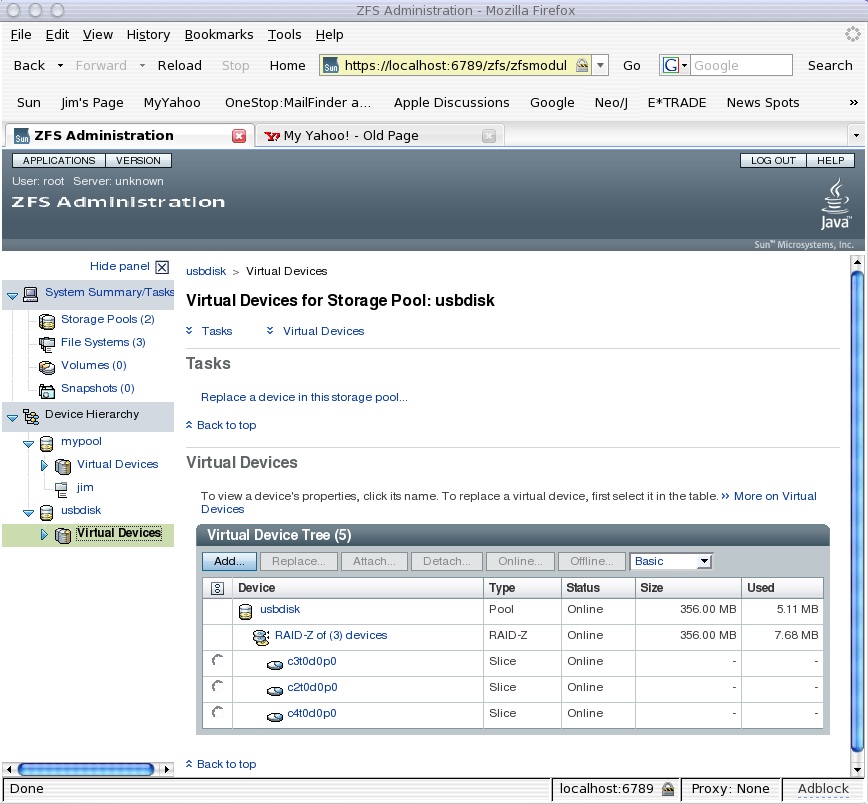
It hasn’t made it into opensolaris yet. But from what i’ve heard it should be making an appearance over from the solaris 10 OS soon. Here is a screenshot of what it looks like…

zfsscreenshot

Should make managing zfs a bit easier - though its already quite easy.  Perhaps if you have quite alot of zpools / zfs file systems it will look prettier.   ;)

Troubleshooting - Time Slider (zfs snapshots)

1. snapshot complains about no access to cron

This problem i came across was after i was playing with crontab. It looks like the zfs snapshot service uses an account called “zfssnap” and if it doesnt have access to cron then it will have issues creating / checking snapshots. Check the file /etc/cron.d/cron.allow and ensure that “zfssnap” is in there. The issues i had looked like this in the log…   (check the logs via the log file viewer)

Windows / Linux - File Migration Tools

In Windows i use robocopy…

This is the syntax to copy from one location to another…  (i like how robocopy uses UNC paths)

robocopy \\192.168.9.70\videos \\192.168.9.101\videos /e /r:2 /w:10 /sec robocopy \\192.168.9.70\software \\192.168.9.101\software /e /r:2 /w:10 /sec

Note: i always copy instead of the move. Run multiple times before switch over to shorten time for final sync. Always use the /SEC to copy over the NTFS permissions. I have had problems with the non X010 version of robocopy not copying NTFS permissions across. Check NTFS permissions before removing the source files. You can update files NTFS permissions with /SECFIX switch if required.

Linux - routing examples

set ip_forward to 1 to enable routing between nics. type ‘route’ to insure both networks are routed as expected (connected route added with nic)

Setup a script with the following (CHMOD 0755 the script so it executes)

iptables -F (clears previous iptables stuff) iptables -P INPUT DROP (will set default policy to DROP all INPUT packets - Incoming to local NICs) iptables -P OUTPUT DROP (will set default policy to DROP all OUTPUT packets - Outgoing to local NICs) iptables -P FORWARD DROP (will set default policy to DROP all FORWARDed packets - Routed via local NICs)

Windows - Port forwarding

Just wanted to note here that there is a tool for windows to ‘port forward’ Its a command MS ships that enables IPv6 to work on IPv4, but can be used as a port redirector…. so as long as you have IPv6 support on your box, you can do this.

syntax as follows;

netsh interface portproxy add v4tov4 listenport=443 connectaddress=targetmachine connectport=3389

so the machine above listens on 443 and redirects traffic to 3389 on targetmachine.

zfs - checking your zpool throughput

This is quite a good diagnostic for checking your disk throughput. Try copying data to and from your zpool while your running this command on the host…

zpool iostat -v unprotected 2

capacity     operations    bandwidth
pool         used  avail   read  write   read  write
----------  -----  -----  -----  -----  -----  -----
unprotected  1.39T   668G     18      7  1.35M   161K
c7d0       696G   403M      1      2  55.1K  21.3K
c9d0       584G   112G      8      2   631K  69.3K
c7d1       141G   555G      8      2   697K  70.0K
----------  -----  -----  -----  -----  -----  -----

The above command will keep displaying the above output every 2 seconds (average during that time). I’ve used it a few times to ensure that all disks are being used (in write operations) where needed. Of course read op’s may not be typically across all disks as it will depend where the data is…

OpenSolaris cifs/smb server - configuring ACL’s on shares - Part 2

I have done most of the explaining in another post on how the permissions work with a zfs cifs share - link here.

In this post I’m going to show an example of how to add multiple groups / users to a specific folder. Which then recursively adds its ACL’’s to any child objects. Its essentially like the other commands i used, but with an extra line per user or group you want to configure;