Solaris-Express

VirtualBox - crashing / freezing

I’ve had some problems since my upgrade to virtualbox 2.2.0 on OpenSolaris. After some time all of my linux boxes seem to just die. The virtual machine just stops responding. Strangely there was no problem with my windows vms after the update.

From what i can tell it looks like the upgrade turned off “IO APIC” - this is the bit that seemed to cause the problem. Re-enabling this on all of my linux boxes seems to have fixed the problem. I’ll continue testing for another week and update this post if any problems re-occur.

opensolaris - zfs PCI-e sata controller

Time for me to add some more sata ports to my opensolaris build. I’ve been using the SI 3114 PCI cards  (4x sata) up until now without any issue, but they are limited by the bandwidth on the PCI slot. Time to upgrade and boost my performance.

At the moment i’m looking at grabbing one of these UIO cards;

AOC-USAS-L8i

http://www.supermicro.com/products/accessories/addon/AOC-USAS-L8i.cfm

From what iv’e been reading these cards will work fine in a PCI-e slot (8x / 16x) after a bit of modding and display the drives straight to opensolaris without any additional drivers etc. (same chipset used in various sun servers)

OpenSolaris - Samba server

Time to share your newly created ZFS volume via samba to your windows clients.  There is some CIFS / SMB support built into the kernel now, but i’ve grown used to the SMB server…

Fire up add software - click filesystems - enable filter for “smb”, there are three packages generally. I get all three, but you only need the kernel update and the server package. The other is the SMB client.

opensolaris - network teaming

Otherwise known as trunking or link aggregation. I believe it is the best way to get that additional boost out of your network server while providing a bit of redundancy on link failure. here is how to do it…

Official docs on the process here… http://docs.sun.com/app/docs/doc/819-6990/gdysn?a=view and some good bits here http://blogs.sun.com/nickyv/entry/link_aggregation_jumpstart_post_install

dladm (data link admin) is the tool for the job. List the links you currently have…

dladm show-link

First shut down the links you are currently using..  (you will have to do this on the console)

opensolaris - smbd issues?

Hmm… i’ve been having problems since the 2009.06 (snv_111b) update with cifs.

Cant pin it exactly as it could be “load” related… hmmm.

found this ? http://opensolaris.org/jive/thread.jspa?threadID=107681 this also may be a clue.. http://opensolaris.org/jive/thread.jspa?threadID=92472&tstart=75

imapd ?  might have to go back to 2008.11

You might get better performance if you enable oplocks but there are known issues with it but you can do it just to see if you see any difference:

svccfg -s smb/server setprop smbd/oplock_enable=boolean: true

OpenSolaris - Headless server

I’ve moved from a CentOS linux distro running vmware server 2.0 to OpenSolaris running VirtualBox. My previous system was totally headless and i wanted something similar to replace it.

I’ve just started getting into OpenSolaris for many reasons (Sun has some cool stuff - ZFS / VirtualBox). But I have always wanted to run OpenSolaris as a headless server, and from what i initially found VirtualBox didn’t have the easy to use autostart on boot features that vmware server had. But there are always ways to get things working…

Opensolaris : Citrix XenServer / ESX - Hooking into ZFS

To share your zfs pool via NFS (that works with Citrix Xen / ESX) to a host called “esxhost”;

zfs set sharenfs=rw,nosuid,root=esxhost tank/nfs

Note : You MUST have a resolvable name from the opensolaris box. i.e. you should be able to ping it. I have tried with ip’s only and it will fail. I have edited the /etc/hosts file to include the following line for my config;

# Copyright 2007 Sun Microsystems, Inc. All rights reserved. # Use is subject to license terms. # # ident “%Z%%M% %I% %E% SMI” # # Internet host table # 192.168.9.120 esxhost

opensolaris / zfs - whitebox build

I’ve built a little server for home use, but it pales in comparison to this beast… This type of setup would be perfect for a lab / test environment that requires lots of fast and reliable disk. SCSI drives are fading out, SATA can perform if its setup right. When you look at the price of the entire build you wonder why corporations continue to spend the big bucks on the big storage names.

zfs - playing with various configs

If you dont have the disks available to build up a zpool and have a play with zfs you can actually just use files created with the mkfile command… The commands are exactly the same.

mkfile 64m disk1

mkfile 64m disk2

mkfile 64m disk3

mkfile 10m disk4

mkfile 100m disk5

mkfile 100m disk6

Now you can create a zpool using the above files… (i’m using raidz for this setup)

zpool create test raidz /fullpath/disk1 /fullpath/disk2 /fullpath/disk3

opensolaris - jumbo frames

If your keen on enabling jumbo frames in opensolaris this is the way…

http://docs.sun.com/app/docs/doc/819-6990/gdyqk?l=en&a=view

# dladm show-phys

LINK       MEDIA        STATE     SPEED     DUPLEX     DEVICE

net0       ether        up        100Mb     full       bge0

itops1     ether        up        100Mb     full       qfe3

web1       ether        up        100Mb     full       bge1

# dladm show-linkprop -p mtu web1

LINK     PROPERTY     VALUE     DEFAULT     POSSIBLE

web1     mtu          1500      1500        –

# ifconfig web1 unplumb

# dladm set-linkprop -p mtu=9000 web1

# ifconfig web1 plumb 10.10.1.2/24 up

VirtualBox - Dup on ping

I’ve had this with certain kernels (2009.06) on opensolaris. Seems there is some incompatibility between some kernels and the opensolaris virtualbox network emulation. This only seems to effect linux virtual guests.

When you try to ping an address you get something like this…

[root@VA-DHCPWEB ~]# ping 192.168.9.15 PING 192.168.9.15 (192.168.9.15) 56(84) bytes of data. 64 bytes from 192.168.9.15: icmp_seq=1 ttl=128 time=1.85 ms 64 bytes from 192.168.9.15: icmp_seq=1 ttl=127 time=1.88 ms (DUP!)

Flashing si3114 to sata only bios

This is the perfect controller for adding additional sata drives into opensolaris (well in terms of price, the bandwidth of the PCI slot is the only negative part). The si3114 comes with the default bios that supports various raid configs, but this requires additional drivers to be loaded.

Essentially the “raid” on the card is called fakeraid as it does not actually process any data itself, but hooks into the cpu via a driver and lets your cpu do all the work.

Opensolaris 2008.11 and xvm

I’ve been dabbling with virtual box up until this point. But have decided to take it to the next step by using xvm to run my virtual machines. I have taken a guide from BDerzhavets at this site : http://bderzhavets.blogspot.com/2008/12/xvm-on-opensolaris-2008.html

First step is to open package manager and find the “vitalization” grouping. Install everything in this group. You’ll probably find some packages are already installed.

Next you’ll need to add the xvm kernel to the grub startup menu (menu.1st). This bit is a bit of blind faith from my perspective - its a shame that the xvm kernel package doesn’t add itself to grub? Anyhow… You need to add the following as another boot option in the /rpool/boot/grub/menu.lst file;

Opensolaris : SMF and Squid

Decided to create a SMF manifest for squid so that it autostarts on boot.

Command to start squid : /usr/squid/sbin/squid 

Command to stop squid : /usr/squid/sbin/squid -k shutdown 

This site has a good starter on SMF creation : http://blogs.sun.com/observatory/entry/mouting_windows_shares_at_startup

I’ve taken a copy of the /var/svc/manifest/network/smb/server.xml file for my squid manifest and placed it at /var/svc/manifest/network/squid/squid.xml

Import the XML using this command; 

svccfg import /var/svc/manifest/network/squid/squid.xml 

Update: i’ve stopped this work as i missed the fact that squid already comes with a SMF manifest! :)  No idea how i missed that one. You can enable via ; 

svcadm enable svc:/network/http:squid

This is the manifest for the above service; 

Opensolaris - configuring squid as a transparent proxy

I used to have a virtual machine that acted as a transparent proxy, but as of late thought i’d move squid onto my host box (opensolaris). This way hopefully increasing the amount of free ram available to the host while also taking advantage of ZFS etc…

So this is a very brief guide on how to configure your opensolaris 2008.11 box as a transparent proxy. Essentially meaning if you set the solaris box as the default gateway all web traffic will be cached as it goes through it before it goes onto your dls router or outside connection.

Opensolaris - Managing Boot Environments with beadm

To get a list of all of your boot environments within Opensolaris use beadm like so…. 

beadm list 

Assuming you know the name of the boot environment that is causing issues you can use the following command (using its name) to remove the ones you think are suss. Note: you need to boot up in the environment that you wish to keep first. 

beadm destroy opensolaris-2

If you destroy an environment that is active on boot it will be changed to another be that is available. You can use the following command to set it to a specific boot environment; 

Opensolaris - where has my memory gone?

Use this command in 2008.11 to get details on where your memory is currently being used…

echo ::memstat | pfexec mdb -k

Page Summary                Pages                MB  %Tot ————     —————-  —————-  —- Kernel                     263992              1031   34% ZFS File Data               91917               359   12% Anon                       376867              1472   48% Exec and libs               11484                44    1% Page cache                   3387                13    0% Free (cachelist)             9766                38    1% Free (freelist)             24807                96    3%

Total                      782220              3055 Physical                   782219              3055

Opensolaris - Updating solaris with the development repository

Want to keep your opensolaris on the “edge” of developments? Most of the experience i have had is that the “dev” repository contains mainly stable releases that are being held until the next official release (every 6 months).

This is how you do it…

Launch Package Manager - and choose “settings” then “manage repositories”

Add the dev repository URL and give it a name.

NOTE: The name cannot contain any spaces!

zfs - java management gui

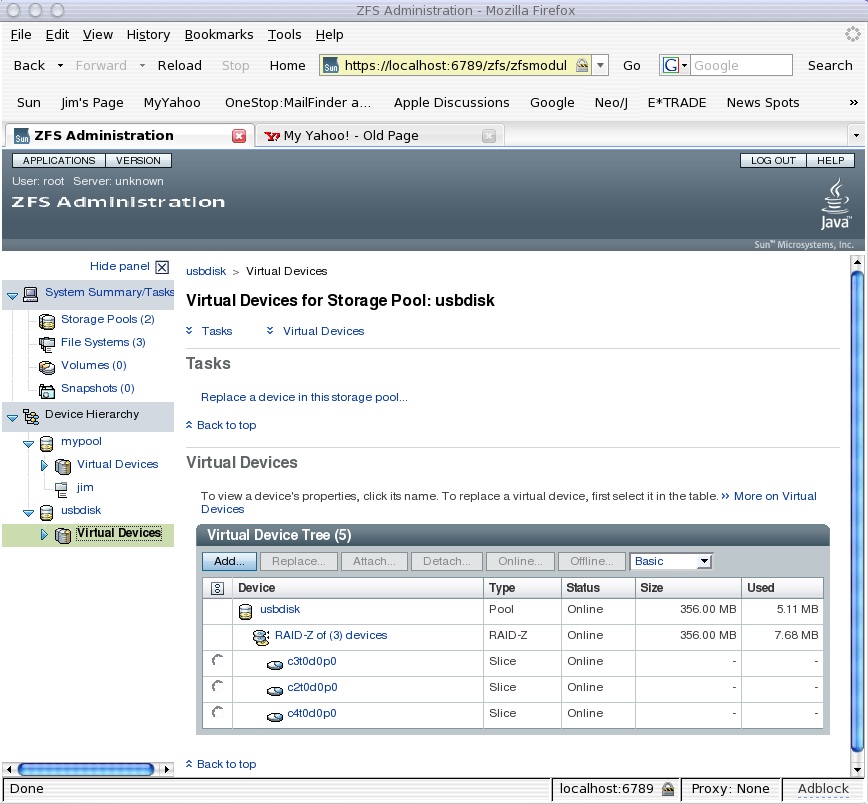
It hasn’t made it into opensolaris yet. But from what i’ve heard it should be making an appearance over from the solaris 10 OS soon. Here is a screenshot of what it looks like…

zfsscreenshot

Should make managing zfs a bit easier - though its already quite easy.  Perhaps if you have quite alot of zpools / zfs file systems it will look prettier.   ;)

Troubleshooting - Time Slider (zfs snapshots)

1. snapshot complains about no access to cron

This problem i came across was after i was playing with crontab. It looks like the zfs snapshot service uses an account called “zfssnap” and if it doesnt have access to cron then it will have issues creating / checking snapshots. Check the file /etc/cron.d/cron.allow and ensure that “zfssnap” is in there. The issues i had looked like this in the log…   (check the logs via the log file viewer)