Posts

Opensolaris - ZFS recovery after kernel panic

Recently i hit what i thought was a huge disaster with my ZFS array. Essentially i was unable to import my zpool without causing the kernel to panic and reboot. Still unsure of the exact reason, but it didn’t seem to be due to a hardware fault. (zpool import showed all disks as ONLINE)

When i tried to import with zpool import -f tank the machine would lockup and reboot (panic).

Opensolaris - white screen on logon

I had this problem when i enabled 3d effects on my server. The screen just goes white and you cannot see anything. Even after a reboot as soon as you logon to gnome the screen goes white.

To fix you’ll need to logon using a “failsafe terminal” session, then run gnome-cleanup from the command line. This will blow away any of your gnome settings (although they are actually backed up to a file), but it’ll mean you’ll be able to logon again without issue.

vmware - HA issues

Most of the time your HA issues are going to be DNS related. So ensure that your vcenter can ping all your hosts by FQDN without issue.  In some cases though a stubborn server may not want to play the game even when everything is configured properly.

This method is considered a “last effort” as you’ll need to run some CLI commands on the ESX box. But i have found it useful in a few situations.

vmware - issues stopping / starting a virtual machine

I’ve had this issue in vSphere where a machine appears to be powered on (both to vCenter and ESXi) but is not actually running.

I get this when trying to power off the virtual machine “…cannot be performed in the current state (powered on)” - which is somewhat strange.

So i have resorted to CLI to check the machines status and then force it off.

This page at vmware explains the various methods (as you progress through them they get more extreme): http://kb.vmware.com/selfservice/microsites/search.do?language=en_US&cmd=displayKC&externalId=1014165

vSphere - ctrl-alt-del greyed out

This bug has hit me. Looks like users with roles like vm user / power user cannot send “ctrl-alt-del” via the console even though they have the correct permissions. Our users cannot use ctrl-alt-ins as they are connected via RDP to a machine that has the console installed.

Found this : http://communities.vmware.com/thread/220683;jsessionid=480C8A2C9B9EACA9FF2BB4E1BECA2D53?start=15&tstart=0

Looks like its a known bug and will be fixed in the upcoming VC4.0 update 1 sometime Q3 2009 :(

MediaPortal - Codecs

SAF seems to be one of the best option out there, the author has a nice post here : http://forum.team-mediaportal.com/codecs-external-players-55/saf-v4-00rc1-standalone-filters-dxva-ready-mpeg2-h-264-vc-1-a-44614/

I was previously using the mega codec pack, but found lately there was some issues with it jerk zooming? - in dark scenes it was jumping in and out. I’ve gone through all the filter settings and ensured everything was disabled, but still the problem comes up. Installing SAF has removed these problems.

Opensolaris - Samba and Network browsing

If you’ve setup samba (rather than the builtin cifs/smb) chances are that you can only browse to your samba shares directly on IP only.

If you want your box “network browseable” you’ll need to load nmbd.

You can find a really good write up on modifiying the SMF for samba to autostart the required service here : http://wikis.sun.com/display/BigAdmin/Enabling+Browsing+with+Samba+in+Solaris+10+Update+4

import this file samba.xml

run these commands;

# svcadm disable samba
# svccfg import samba.xml
# svccfg delete svc:/network/samba:default
# svcadm refresh samba:smbd
# svcadm refresh samba:nmbd
# svcadm enable samba:smbd
# svcadm enable samba:nmbd

VirtualBox - crashing / freezing

I’ve had some problems since my upgrade to virtualbox 2.2.0 on OpenSolaris. After some time all of my linux boxes seem to just die. The virtual machine just stops responding. Strangely there was no problem with my windows vms after the update.

From what i can tell it looks like the upgrade turned off “IO APIC” - this is the bit that seemed to cause the problem. Re-enabling this on all of my linux boxes seems to have fixed the problem. I’ll continue testing for another week and update this post if any problems re-occur.

opensolaris - zfs PCI-e sata controller

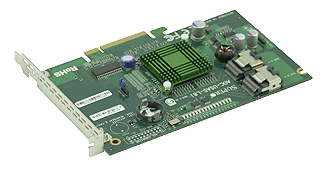
Time for me to add some more sata ports to my opensolaris build. I’ve been using the SI 3114 PCI cards  (4x sata) up until now without any issue, but they are limited by the bandwidth on the PCI slot. Time to upgrade and boost my performance.

At the moment i’m looking at grabbing one of these UIO cards;

AOC-USAS-L8i

http://www.supermicro.com/products/accessories/addon/AOC-USAS-L8i.cfm

From what iv’e been reading these cards will work fine in a PCI-e slot (8x / 16x) after a bit of modding and display the drives straight to opensolaris without any additional drivers etc. (same chipset used in various sun servers)

PC Build - May be time to upgrade my rig soon

This is my current gaming machine which i built earlier this year - i decided to have had a play with water cooling before i put anything too expensive into the case. :)

Its a Intel E8400 running at 4.14Ghz, i’ve only got 2Gb of ram and 2 x 120Gb HDD’s in raid 0

I’ll keep the case and water cooling setup when i move to i7. Probably just grab a 1366 mount kit for my fusion v2 waterblock.

Encoding Vids - Atomic advice on mencoder

One of the writers for Atomic mag spent some time upscalling his dvd collection to 720p. This is the commandline he used in the end to get a great clear result.

commandline ;

mencoder -sws 9 -vf scale=1280:720,hqdn3d=6:5:8,unsharp=17x5:1,pp=ha:128:7/va/dr/al - ovc x264 -x264encopts subq=9:b_pyramid:weight_b:8x8dct:me=umh:cabac:partitions=all:trellis=2:mixed_refs:direct_pred=auto:psy-rd=1.0,0.2:qp=16:threads=2:nodct_decimate:nofast_pskip:bframes=6:frameref=6 -oac copy dvd://1 -o output.avi

Of course it may change depending on what you are encoding, but its a good place to start. Check the atomic fourms (au) for more detail etc…

ESX - network utilization

One of the best articles i have found on this subject is here : http://blog.scottlowe.org/2008/07/16/understanding-nic-utilization-in-vmware-esx/

There is some additional information here on setting up an etherchannel on the cisco side : http://blog.scottlowe.org/2006/12/04/esx-server-nic-teaming-and-vlan-trunking/

This can be handy if you need a single VM to use both physical nics in a load-balanced manner - both outbound and inbound. Of course its not really that simple though. This will really only add a benefit if the VM is communicating to multiple destinations (using ip hash - a single destination from a single VM with one IP will always be limited to the same physical nic).

zfs compression and latency

Since im using ZFS as storage via NFS for my some of my vmware environments i need to ensure that latency on my disk is reduced where ever possible.

There is alot of talk about ZFS compression being “faster” than a non-compressed pool due to less physical data being pulled off the drives. This of course depends on the system powering ZFS, but i wanted to run some tests specifically on latency. Throughput is fine in some situations, but latency is a killer when it comes to lots of small reads and writes (in the case of hosting virtual machines)

windows 2000 - ITMU / Windows Update Issues

Get this when doing a windows update - Error number: 0xC8000408

First check the basics, ensure that windows update is a trusted site and the seucirty level is set corretely within the Zone - test with lower secuirty to see if that resolves the problem.

If that doesnt work try the following; 1) Added the user SYSTEM with every privilege to C: and subs 2) Stopped the “Automatic Updates” service 3) Renamed the C:\WINNT\SoftwareDistribution folder 4) Started the “Automatic Updates” service again

ESX 4 (vSphere) - installation issues

I’ve had a couple of installation issues with ESX4

One was particularly strange, the install process would freeze every now and again until i pressed a key on the keyboard. This was related to AMD’s power saving C1 mode - disable this in the bios to fix this problem.

Secondly it was a problem with my nic. Essentially i didn’t have card that was supported (realtek). After inserting a intel card all was well. This fires up a ambiguous error and cans the whole install. (lvmdriver error)

OpenSolaris - Samba server

Time to share your newly created ZFS volume via samba to your windows clients.  There is some CIFS / SMB support built into the kernel now, but i’ve grown used to the SMB server…

Fire up add software - click filesystems - enable filter for “smb”, there are three packages generally. I get all three, but you only need the kernel update and the server package. The other is the SMB client.

opensolaris - network teaming

Otherwise known as trunking or link aggregation. I believe it is the best way to get that additional boost out of your network server while providing a bit of redundancy on link failure. here is how to do it…

Official docs on the process here… http://docs.sun.com/app/docs/doc/819-6990/gdysn?a=view and some good bits here http://blogs.sun.com/nickyv/entry/link_aggregation_jumpstart_post_install

dladm (data link admin) is the tool for the job. List the links you currently have…

dladm show-link

First shut down the links you are currently using..  (you will have to do this on the console)

SCCM - installing client via GPO

If you dont have sms / sccm client in your gold disk then GPO is the next best thing to get the SCCM client out into your environment.

This is a real nice and clean install script for IE 7 which i have modified to install SCCM. http://www.symantec.com/connect/blogs/installing-application-using-vbscript

object.Run(strCommand, [intWindowStyle],[bWaitOnReturn])  

'INSTALL MS INTERNET EXPLORER 7 USING VBScript    
Set objShell = WScript.CreateObject("WScript.Shell")
spath = objShell.CurrentDirectory

If fso.FileExists(spath & "\IE7-WindowsXP-x86-enu.exe") Then
	path = """" & spath & "\IE7-WindowsXP-x86-enu.exe" & """ /passive /norestart /update-no"
	objShell.Run(path, 1 ,True)
	i = 0
	'INSTALL MICROSOFT INTERNET EXPLORER 7    
	i = objShell.Run(path, 1 ,True)
	If (i = 0) Or (i = 3010) Then 
		'WRITE EXIT CODE [0-success/3010-success&requires reboot] TO EVENTLOG
		objShell.LogEvent vbLogSuccess, sLogHeader & "Microsoft Internet Explorer 7 installation completed successfully." & VbCrLf & "Exit code: " & i
	Else
		MsgBox "The installation of Microsoft Internet Explorer 7 returned an error: " & i & VbCrLf & _
		"Please contact IT Support to report this error.", vbOKOnly
		objShell.LogEvent vbLogError, sLogHeader & "Installation returned failure code: " & VbCrLf & "Exit code: " & i
	End If

Else
	WScript.Quit (1)
End If

set fso = Nothing
set WSHShell = Nothing
Wscript.Quit
Citrix XenServer 5.5 - First impressions

I had decided to try out Citrix Xen Server at home since i work a lot with vmware during my working week and felt like a change. It all seemed well… That is until i had to deal with snapshots. I suppose i have taken for granted almost all other virtual host software that provides a simple “revert to snapshot” option. From what i can tell this is totally absent from Citrix XenServer 5.5.

selinux - opening additional ports / or disabling

If you are having problems starting apache on a non-standard port you might find that the problem is related to selinux.

Type this command to check to see what http ports are currently allowed;  (remove filter to show all rules)

semanage port -l|grep http

To add another port type the following (with the port you wish to add etc);

semanage port -a -t http_port_t -p tcp 81

If you want to disable selinux completely then go into /etc/selinux/config and set selinux=disabled. Save then reboot.